The original image, with its original size and aspect ratio
2
Resized to half size using array slicing (brute force)
3
Resized to 200x200, squashing the image width to equal its height
4
Resized to 3/4 of its original size, preserving the aspect ratio (for the most part)
5
Resized to make the height half the original, width unchanged
6
Resized to be 1.5 times its original size, preserving the aspect ratio
Affine warping
For the other geometric transformation, we will only look at affine warping
\[x_{new} = a \cdot x_{old} + b \cdot y_{old} + t_x\]
\[y_{new} = c \cdot x_{old} + d \cdot y_{old} + t_y\]
We can write these in terms of matrix and vector operations, like this:
\[
\begin{bmatrix}
x_{new} \\
y_{new} \\
1
\end{bmatrix} =
\begin{bmatrix}
a & b & t_x \\
c & d & t_y \\
0 & 0 & 1 \\
\end{bmatrix}
\cdot \begin{bmatrix}
x_{old} \\
y_{old} \\
1
\end{bmatrix}
\]
Depending on the values for \(a\), \(b\), \(c\), \(d\), and \(t_x\) and \(t_y\), we change the view of the image in very different ways (translating, rotating, skewing, stretching/squashing, … warping!)
All of these geometric transformation will be done with the warpAffine function. To call it we do this:
newImage = cv2.warpAffine(oldImage, matrix, size)
The function takes in three inputs:
oldImage, the old image we want to transform
matrix, a 2x3 matrix of 32-bit floating-point numbers, it gives the six values from the formulas above \[
\begin{bmatrix}
a & b & t_x \\
c & d & t_y \\
\end{bmatrix}
\]
size, a tuple of width and height for the new image
Translation
When we translate an image, we move all the pixels right or left by some fixed amount, and up or down as well. Translation is the simplest of the affine warp transformations. Because of this, OpenCV doesn’t provide a helper function to help us to create the 2x3 matrix that the warpAffine function needs.
A simple example:
astilIm = cv2.imread("SampleImages/
Wednesday, October 22
Announcements
Homework 3, due November 7!
Coding quiz redos: through the end of next week
Office hours changing
Be prepared to discuss Ethics and Sci-Fi 7 Friday!
Midterm Grades:*
Today’s Topics
Image filters
Morphological filters
Erosion and dilation
Opening and closing
Black hat and top hat
Gradient
Convolutional filters
Blurring
Edge detection
See Readings document for details…
Friday, October 24
Advising:
Midterm grades are out now
Come talk to me if you have concerns about this class, or your others
Go talk to your professors if you are surprised or unsure about your midterm grade
Upcoming dates:
November 7: Last Day to Withdraw from a Class
November 10: First Day to Designate Grading Option
November 10:Registration for Spring 2026 courses begins
Nov 10-11, Seniors
Nov 12-13, Juniors
Nov 14-17, Sophomores
Nov 18-19, First-years
Nov 20-21, Wrap up days
MSCS:
Tuesday, 8:30-9:30am: Hot Chocolate with the MSCS Student Advisory Board (SAB)
Stop by to meet other MSCS students and members of SAB. Relatedly, are you a first year, sophomore, junior, or senior MSCS student / major / minor dedicated to building a welcoming, supportive, and inclusive MSCS community? Please consider applying to become a SAB member yourself! For more information about SAB and applications (due 11/4 by 11:00am), please check out this google form.
Tuesday, 12:00-1:00pm: MSCS seminar with Mac Prof Dan Drake
Skeptical that “bad predictions” are sometimes better?! Come to this talk.
Thursday, 3:00-4:30pm: weekly Math problem solving
Please drop in. All experience levels welcome!
Our class:
Homework 3, due November 7!
Coding quiz redos: through the end of next week
Office hours changing next week:
Monday + Wednesday: 4:30-5:30pm
Tuesday + Thursday: 3:00-4:30pm
By-appointment times: MW, 10:30-11:30 or MWF 1:00-2:00
Be prepared to discuss Ethics and Sci-Fi 7 Today
Today’s Topics
Image filters
Convolutional filters
Edge detection
See Readings for details!
Week 9
Monday, October 27
Announcements
Homework 3: start on it soon! Due November 7
Focused on computer vision applications, particularly thresholds, masks, geometric transformations, filters, etc.
Be prepared to discuss Ethics and Sci-Fi 8 Friday
New office hours: MW 4:30-5:30, TR 3:00-4:30, plus some “by appointment” hours earlier in the day (see calendar)
Today’s topics
Upcoming essays
2 short essays, started in class
Extended essay, requires some library research, connected (loosely) to team project
Specific prompt given at the start of class: 40 minutes to think, review notes, and outline/write a draft of the essay
Last 20 minutes of class, meet with a peer and exchange outlines/drafts and give feedback about them
Feedback from me after that class, about 1 week to finish the paper
Short essay 1 will include prompts that focus on themes around privacy: personal and data privacy, surveillance by government, society, or other individuals, expectations of privacy or anonymity in a modern, “connected” society
Extended essay will be about AI or personal ethics, or social issues caused by the use of AI, as these connect to computer vision, particularly your team project topic.
Activity: read through rubric, read through a paper assigned for this week, and look at how they connect to each other
Project overview
Team project (2-3 is the norm, see me if you have reasons for exceptions)
Projects must use OpenCV, Mediapipe, or Tensorflow
WIDE range of project topics, suitable to a wide range of programming experience
Activity: Read through the project overview document, and then add your name to projects that sound interesting to you
Wednesday, October 29
Announcements
Homework 3: start on it soon! Due November 7
Focused on computer vision applications, particularly thresholds, masks, geometric transformations, filters, etc.
Be prepared to discuss Ethics and Sci-Fi 8 Friday
New office hours: MW 4:30-5:30, TR 3:00-4:30, plus some “by appointment” hours earlier in the day (see calendar)
Coding quiz redos: Through Friday (see me if that’s an issue)
Homework question redos:
You fix your submission
You come to see me and explain what you changed/did
Focused on computer vision applications, particularly thresholds, masks, geometric transformations, filters, etc.
Be prepared to discuss Ethics and Sci-Fi 8 Friday
New office hours: MW 4:30-5:30, TR 3:00-4:30, plus some “by appointment” hours earlier in the day (see calendar)
Coding quiz redos: Through Sunday
Homework question redos:
You fix your submission
You come to see me and explain what you changed/did
I regrade your new submission
REMEMBER: Prepare notes for Monday’s in-class essay-writing activity
General topic is about privacy and surveillance
Specific prompts will be given on Monday: you will choose one of three options
Prompts will ask you to draw on examples/evidence from Ethics and Sci-Fi stories, other readings, and videos
You may bring and use any amount of paper notes you like
No computers on Monday
First 40 minutes of class: choosing your thesis and writing an outline, or even starting to draft your paper
Last 20 minutes of class: exchanging ideas with a peer and giving/getting feedback/ideas from them
Today’s topics
Motion Detection
Background Subtraction
CamShift color-tracking
Motion detection
Compute the difference between current frame of video and the previous one
Process that with thresholding, etc. to find where motion is
Good at detecting edges of moving objects
Background subtraction
Keeps a background image, or “model” of background
Computes difference between frame and background model
Process that with thresholding etc. to find where foreground, moving objects are
MOG2: Mixture of Gaussians
At each pixel, collect up the color values over time
Compute the variation in those color values
Describe the variation as a function: a mixture of gaussian curves: \(P(x, y) = a \cdot G_1(x, y) + b \cdot G_2(x, y) + c \cdot G_3(x, y)\)
Function returns the probability of a pixel being background
Use functions to determine which pixels are background, set them to zero
KNN: K Nearest Neighbors
At each pixel, collect up the color values over time
Determine the minimum size sphere (R, G, and B dimensions) that encloses at least K of the color values
If a new pixel color is within the sphere, it is background, otherwise it is foreground
CAMShift color detection
Keeps a track window that encloses the object being tracked (initialized to the whole window, algorithm shrinks it)
Uses a hue histogram and performs backprojection to determine probability of each pixel in the track window being the target color
Camshift function then:
Computes the center of mass of the track window
If that is at the center, then the track window is centered on the object: change its size and return it
Otherwise, move track window to center on center of mass, and repeat
Week 10
Monday, November 3
Announcements
Due dates this week:
Homework 3: Due November 7
Last Ethics and Sci-Fi is due Friday: no in-class discussion!
Project 1: Due November 5
Extended essay 1: Due November 7
Friday this week: Library session! Meet in same room in the library…
Focused on how to find resources for your extended essays
Have topic determined by Friday
Registration: you will register on November 13!
MSCS Registration Ice Cream Social: Thursday, November 6
MSCS Seminar this week, Thursday, 4:40-5:40pm
Today’s topics
First short essay in-class start!
Stage 1: 2:20pm-3:00pm
Read through the handout and pick one prompt
Brainstorm what you want to say
Create a detailed outline of your argument
Start writing essay if you have time
Put your name on each page, and number them!
Stage 2: 3:00-3:20pm
Discuss your ideas with a peer and get/give feedback (3:00pm to 3:20pm)
Hand in all paper brainstorming, outline, draft to me at the end
Wednesday, November 5
Announcements
Due dates this week:
Homework 3: Due November 7
Last Ethics and Sci-Fi is due Friday: no in-class discussion!
Project 1: Due November 5
Extended essay 1: Due November 7
Short essay 1: Due November 14
Read carefully the Short Essay 1 Guide
I am being lenient about what you handed in this time, but many of you might not have qualified for a Gold rating on the final paper if I hadn’t been lenient
Next round, Short Essay 2, I will be more stringent about what you submit at the end of the first hour
Starting today! ICAs will be work on Homework 4
I will post Milestone 2 of the project later today
Friday this week: Library session! Meet in same room in the library…
Focused on how to find resources for your extended essays
Have topic determined by Friday
Registration: you will register on November 13!
MSCS Registration Ice Cream Social: Thursday, November 6
MSCS Seminar this week, Wednesday, 4:40-5:40pm, OLRI 100
Today’s topics
Using trained models: Mediapipe!
Basic face detection model
Facial landmark detection
Hand landmark detection (skeletonization)
Body pose landmark detection
The Mediapipe project provides sophisticated models trained on large datasets, that we can use and even modify for free.
Key points
Try all four (five, optionally) demo programs
Pick two to extend
Extend them by selecting information from the detection results and using it to identify certain actions (facing left/right, closing eyes, palms versus fists, hands up or down)
Friday, November 7
Announcements
Due dates this week:
Due today:
Homework 3: Due November 7
Ethics and Sci-Fi 9
Extended essay 1: Due November 7
Due last Wednesday:
Project 1: Due November 5
Short essay 1: Due November 14
Read carefully the Short Essay 1 Guide
I am being lenient about what you handed in this time, but many of you might not have qualified for a Gold rating on the final paper if I hadn’t been lenient
Next round, Short Essay 2, I will be more stringent about what you submit at the end of the first hour
Homework 4 is posted, with 3 questions ready for you to work on
Project Milestone 2 is posted
Today: Library session! Meet in Library 206
Focused on how to find resources for your extended essays
Registration: you will register on November 13!
Week 11
Monday, November 10
Announcements
Upcoming due dates
November 14:
Short essay 1: Read carefully the Short Essay 1 Guide
Make-up Ethics and Sci-Fi available this week (if you missed one, do this to make it up!)
November 21:
Project Milestone 2 – going over today
Extended essay rough draft
December 3:
Homework 4 (currently only 3 questions are ready)
Homework 4: work in teams
ICA last Wednesday, today, and Friday: work in teams: each will be part of Homework 4
Next week: project (and other assignment) work time
come to class and work on ICAs, Homework or Project
Today’s topics
Designing your project
Convolutional Neural Networks
What are they?
How do they work?
How do we train them?
Designing your project
Why?
Working in a team? Everyone has to agree or pieces don’t fit
Get past programmer’s block: break problem into bite-sized pieces that you can then tackle without getting overwhelmed
Make coding easier and faster
Avoid bad design through haphazard programming
Define the problem clearly and thoroughly
How does someone interact with your program?
What does it do, exactly?
What features will the program have for sure, what are optional add-ons?
Think about information that program needs
Data structures
Information in files?
Break program into separate sensible functions (a hierarchy)
What modules/tools do you need (OpenCV, Mediapipe, Tensorflow, etc.)
Example: Hunt the Wumpus (my AI students work with this one)
Specify the game:
Will display the game board and all the known squares for the user, including where the user is
Game board is a 2d grid which wraps around from side to side
Somewhere in the grid there is a Wumpus, a monster. The monster makes all cells that are within 2 of the wumpus have a terrible smell. The wumpus is sleeping in a cell; we don’t know where. If the hero enters the cell where the wumpus is, the wumpus will wake up and eat them.
There are some number of pits in cells of the grid, we don’t know where. If the hero enters a cell with a pit, they will fall in the pit and die.
The hero can kill the wumpus (and win the game) by figuring out where it is, and shooting an arrow toward the cell where the wumpus is. If the hero guesses wrong, the sound of the arrow will awaken the wumpus, wherever it is, and it will come to find the hero and kill them.
Ask the user which direction to move or which direction to shoot the arrow
Did the user die or win the game?
If not, display the updated map with new information on it and repeat
Top-Down Design:
Start this only once you have determined what the program should do, and kinds of data you will be using for the program.
Designing in a “top-down” way, from the main program to its helpers, can ensure that the pieces we design all fit together, and it can be easier to think about the whole overall task first, and then drill down to the finer details of the helper functions.
Start with pseudocode to describe the main program
Any steps that seem complicated, or making the pseudocode too long, turn that step into its own function
This simplifies the main program, now that step is just one line, a call to the function
Thinking about the complicated step in isolation can be simpler
Repeat this for each helper function, maybe generating more helper functions for it!
Build a “tree” of functions, each specified in pseudocode
For each pseudocode function, figure out what input parameters it needs, and what returned values or effects it has
Write out the entire design and make sure that it all makes sense. Is anything left out?
Bottom-up Implementation with testing integrated
While designing from the top down works well, implementing the program that way does not work well for most of us. Instead, we will start with the “leaves” of our tree of functions, because they are the most simple parts, and they don’t rely on any other functions we need to implement.
The goal is to implement and test/debug one function at a time, working from the leaves at the bottom gradually up to the main program itself. This keeps the testing and debugging focused on a small amount of code at any time, and ensures that when you implement a function, you can test it right away, because you’ve already implemented and tested any functions it relies on.
Start with “leaves” of the tree, simplest functions.
Implement, document, and test before going on
Examples of design documents from Comp 123
Below is a link to a document containing sample design documents from several years ago in Comp 123. While their project topics are different, the project requirements are very similar. Not all of these design documents earned full credit: my grading comments are included, though the student names are blocked out.
An algorithm that finds patterns in data (to solve some task)
Given a dataset of examples, predict the correct outcomes
Generalize to new examples that it hasn’t seen before
Why use ML?
To learn about learning
To make a system that can adapt to changes in its environment
Because we don’t know how to solve a problem otherwise
Computer is better at finding statistical patterns in large, complex data than we are
Terminology
induction, the process of generalizing from examples to a general rule (this is really what ML does)
prior knowledge, what the agent knows before learning starts
training “from scratch”, assuming no prior knowledge in the agent
factored/vector representation, when the input data is in the form of a vector of attribute values Other representations are possible, including images, sounds, text, but require special handling
classification, probably the most common ML task, categorizing input examples into a finite set of classes or categories
regression, from input examples, produce an output number (thus the artifact is approximation a numerical function of some kind)
transfer learning, using a model trained for a different task as a starting point Variations on this: transfer learning, retraining, finetuning
Kinds of machine learning
What kind of feedback is the ML system given about its learning task
Supervised learning, the most common kind, where the system is given both the input example and the correct output and just needs to learn to produce one from the other
Training a robot car to drive on a track by recording a human driving on tracks, and then asking the robot to replicate what the human would do
Self-supervised learning, to me this is just a special case of supervised learning: the target values are intrinsic parts of the data itself, so getting targets is automated
Auto-association, model trained to reproduce its input
Sequential data, predict-the-next (this is what LMMs do)
Reinforcement learning, difficult, but more interesting! The system is given input examples, chooses some action, and then is rewarded or punished based on the action it takes. It is not told the right answer
Training a robot car to drive on a track by rewarding it for staying in its lane, or following a line
Unsupervised learning, The system is given input examples, and produces something from them with no goal stated
Clustering is the most common kind: collecting examples by similarity into some fixed number of groups
Some deep learning systems leverage a smallish supervised learning dataset to extend to a large unlabeled dataset, sometimes called semi-supervised learning
Supervised learning
Given a training set that specifies input examples and the correct outputs for them, find patterns and regularities in the data that allow you to infer outputs from inputs
Training set: often written as (x, y), where x = (x1, x2, …, xn) and y = (y1, y2, …, yn), and x is the input, y is the correct output
Algorithm builds a model
Goal is generalization
It is (fairly) easy to build a model that performs well on the examples it was trained on (it can just memorize the dataset, if nothing else)
We really want the model to perform well on new examples it has never seen before!
Overfitting: When the model incorporates irrelevant features of the data because of peculiarities of its particular dataset, so it pays attention to too much, and doesn’t generalize well
Underfitting: When the model can’t successfully operate on the training data, when it hasn’t learned the task (perhaps because it lacks enough information or can’t represent the pattern)
Process for running an ML supervised learning algorithm:
Build a dataset and label each example with the correct answer (or acquire an existing dataset, much easier!)
Perform any preprocessing on the data, including various transformations and things like principal components analysis (PCA), that let you simplify the data
Divide the dataset into at least two parts, better yet three parts
Training data: the data the ML algorithm will actually see
Validation data: data you will reserve to assess the generalization and overfitting of the model, as you are tweaking its parameters and form
Testing data: data you hold in reserve and never use during the development of the model; you use it only to test the final trained model to evaluate if the model has become biased toward the validation data
Sometimes the testing set is omitted, and we call the validation set the testing set for simplicity
Run the ML algorithm, then tweak it, and run it again, and repeat until the performance of the model is as good as you can get it
Evaluating ML Models
Loss
The loss function is how the algorithm computes the error in the performance of the ML model. It captures differences between the target and the actual output of the model.
There are many many loss functions for different machine learning models, you don’t need to know about them
Accuracy
One measure of how well the model works: percentage of samples for which the correct answer was given
Convolutional Neural Networks
Designed to process images or other matrix-like data
Architecture depends on the task
Classification/regression (simplest)
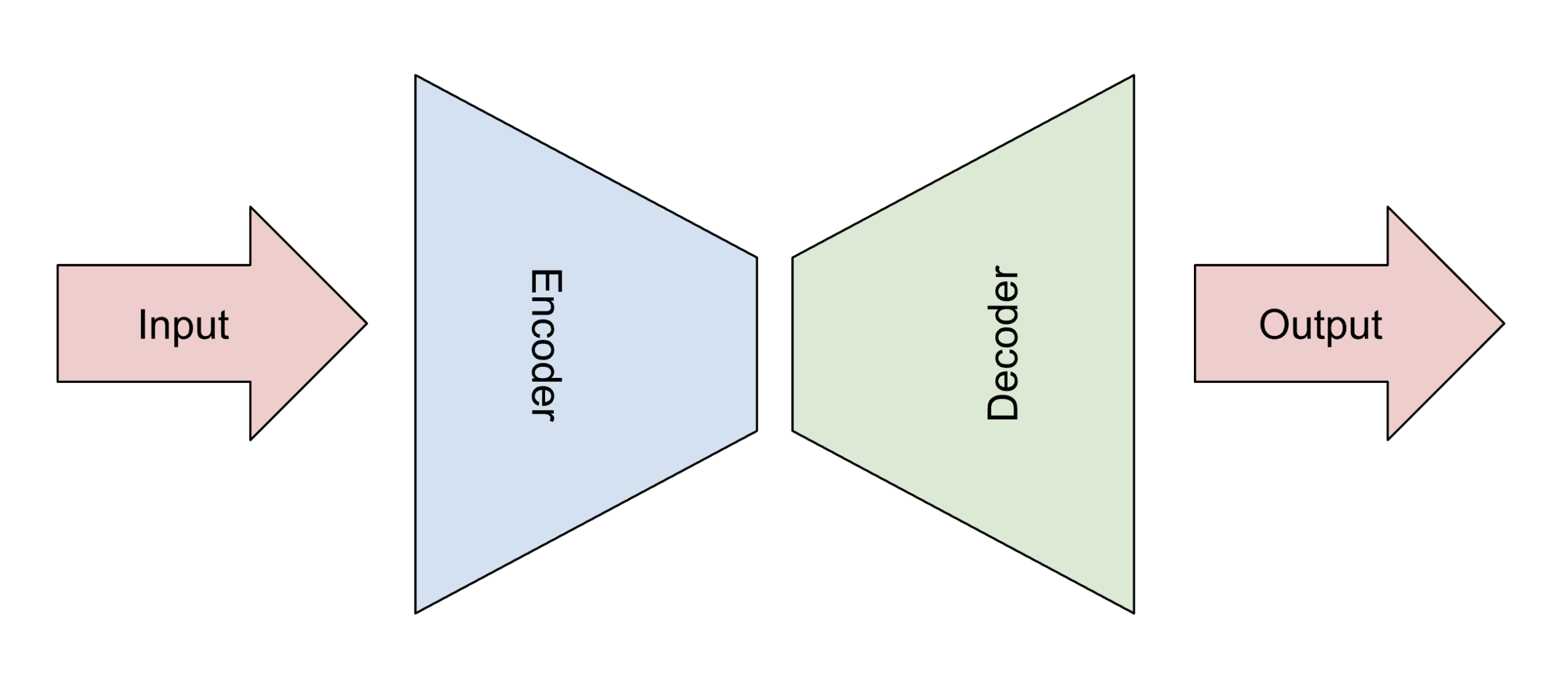
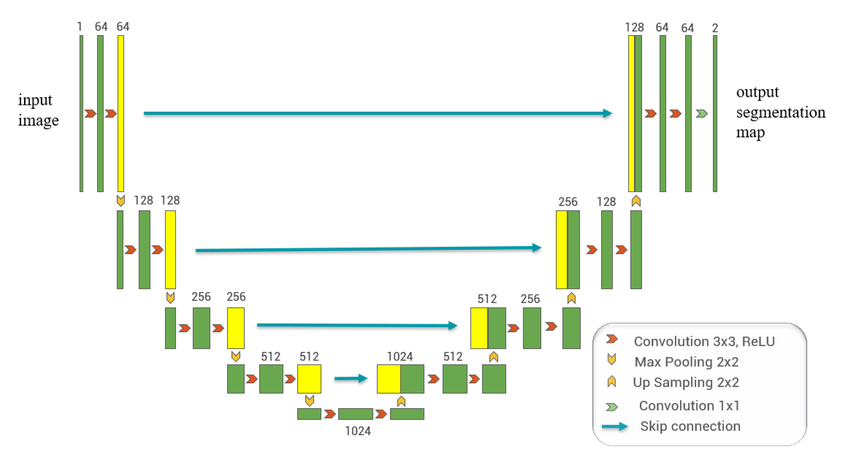
Autoencoding, image segmentation, or augmentation (more complicated, U networks)
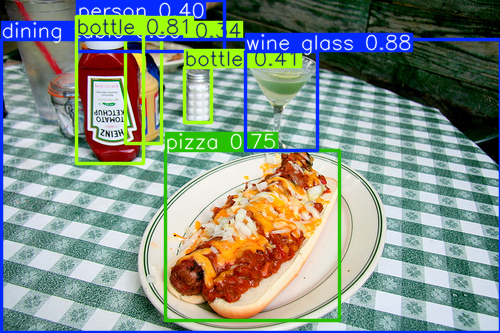
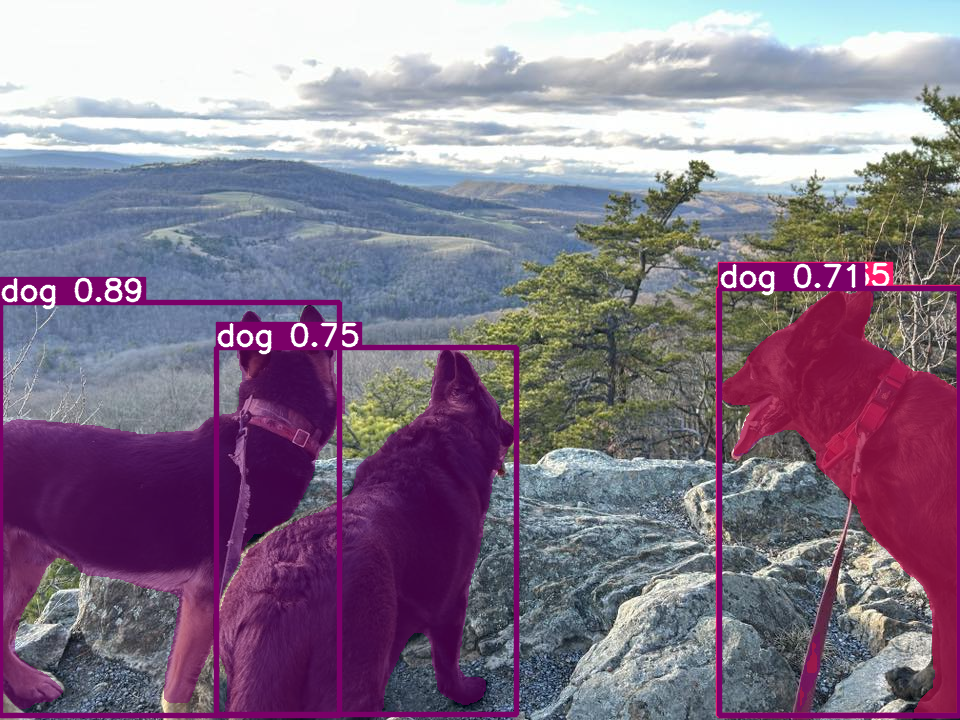
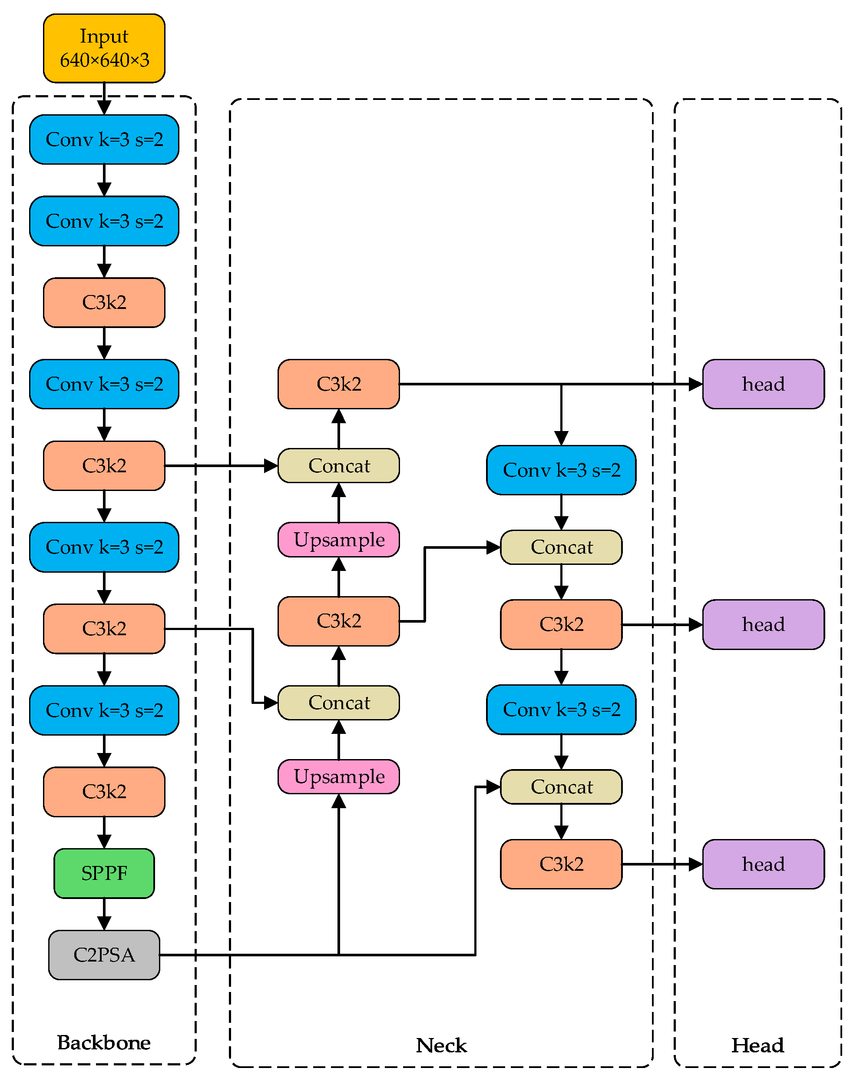
Object detection (YOLO, RCNN…)
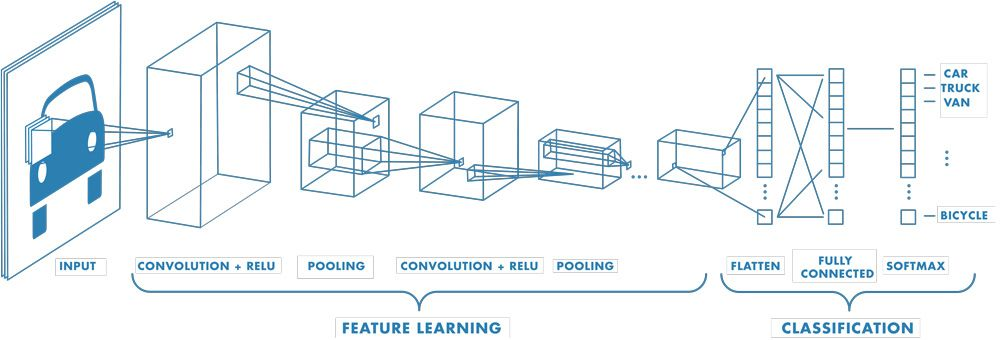
Simple view of classification CNN, found multiple places, perhaps originally from Mathworks
Input: an image (in this case a color one)
Output: one of a set of categories
Feature learning: uses two new kinds of layers: convolution and pooling
Classification: Converts the multi-d representation of features into a linear vector, and runs as a traditional neural network
Convolutional layer
Each layer contains a set of convolutional filters of a fixed size.
Each filter has a kernel, a matrix containing weights. These weights are learned by the training algorithm, and are initially random
The filter is applied to a small region of the image, and performs a weighted sum of the weights with the values in the region. We then slide the filter all over the image, computing the weighted sum at each location, and we produce a feature map where larger values indicate the presence of the feature the kernel is looking for (remember that this “feature” is initially random, and gradually is learned through training)
The output of the layer is the set of feature maps produced by each filter in the layer
Pooling layers
Pooling layers are not modified in the learning process. They just reduce the size of the feature map given to them. This is sometimes called downsampling in computer vision terms.
The most common kind of pooling is max-pooling: given a small region of an image, pick the max value: the region turns into one value
Why?
Size of data can blow up if we don’t reduce it (apply 64 filters to a 100x100 image and get roughly 64x100x100 out! Looking for larger-scale features that sprawl across a larger region of the image: downsampling scales those features down to where our filters can detect them
Other layers to know about
Drop-out layers: to help with overfitting, on any particular sample being processed, some adjacent units are disabled. Forces generalization and lack of reliance on any specific part of the network
Softmax: an output layer that converts the output activations of the previous layer into probabilities: we can choose the highest probability as the network’s output
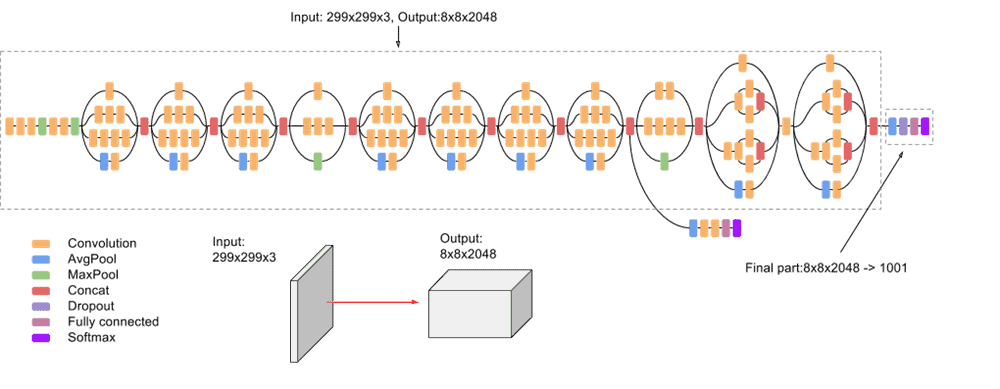
CNN size and complexity can be small to huge!
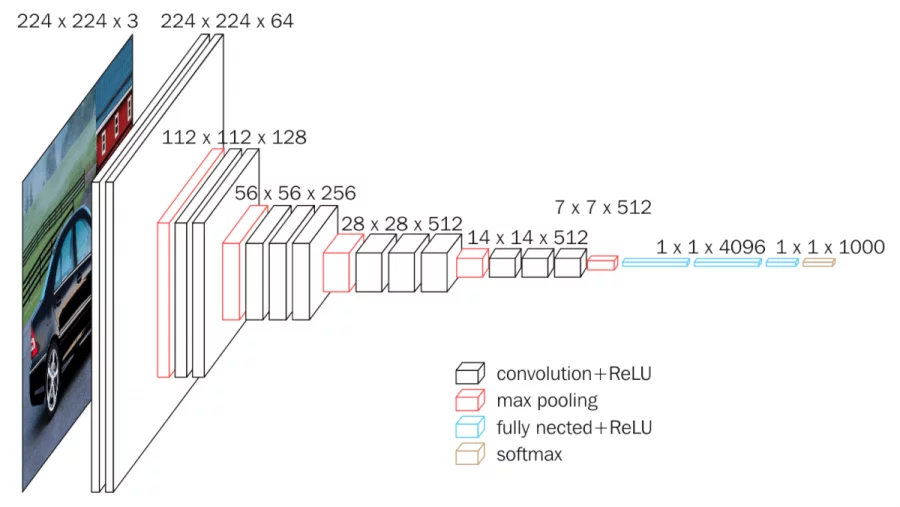
The VGG Network, a small but popular CNN model From Neurohive