- 1
-
Converts the float
39.2into the string"39.2" - 2
-
Converts the float
44.1into the integer44 - 3
-
Converts the string
"192"into the integer192 - 4
-
Converts the integer
103into the float103.0 - 5
-
Converts the string
"39.2"into the float39.2
Week 0
Orientation meeting
Announcements:
- ???
Today’s plan:
- Getting to know each other
- Advising
- Course overview
- Activity
Introductions
Introduce yourself and tell us:
- Your name
- Where is home for you right now?
- What are your academic interests?
- What do you like to do outside of school?
- Pick an animal mascot for yourself: what is your favorite animal?
What are the goals of the FYC program in general
- Introduce students to critical inquiry within at least one discipline or interdisciplinary area.
- Introduce students to library research skills.
- Ensure that students receive explicit writing instruction, including the opportunity to revise writing based on faculty feedback.
- Help students adjust to Macalester’s academic expectations.
- Connect incoming students to advisors who get to know the students well from the start.
- Provide a supportive community of other first-year students with shared interests and experiences to aid in the transition to college.
Things to know about classes at Macalester
Attendance: Going to class is expected.
- If you need to miss class, send an email to the professor explaining why.
Sample email
Dear Prof. Faculty Name,
I am not going to be able to attend class on Day/Date, because Reason. I’m sorry about missing class, and I will do my best to make up anything I have missed. Please let me know if there are specific things I should be looking at; I will stop by your office hours to check in.
Student name
- Try to let your faculty member know before class time, as early as possible.
- Plan on getting notes or resources from the class (ideally from a peer, but also ask the professor or the preceptor).
- If you are sick, stay home!
Office Hours: Office hours are times that faculty members set aside to meet with students. They are your time with your faculty members: a great time to ask questions, get feedback on your work, etc.
When I am holding office hours and no one comes, I do other work. But I am happy to be interrupted by students coming with questions.
How much time do you have? You will spend less time in class than you probably did in high school. That puts more responsibility on you to plan your work and study times!
- You may feel like you have too much free time: think about scheduling times for work, exercise, relaxation
- You may get involved in many activities, and find yourself short of time: find tools for prioritizing your tasks and planning your time
Seeking help: Sometimes incoming students come to Mac used to being the ones to help others out, and never needing help. Macalester is different and can be challenging. The most successful students are those who look for help:
- Professor and preceptor office hours
- Academic Success at Mac: Parts of this used to be called the Max Center, tutors are available for several disciplines, and professional help for building skills
- Research assistance in the Library
Quick overview of course and tools (15 minutes)
- Course goals
- Develop skill as Python programmer
- Learn to use tools for image processing and computer vision
- Explore ethics and how it applies to you and to technology (AI ethics)
- Practice and improve as college-level writers
- What will this course be like?
- Moodle is our hub for everything
- We will use Slack for announcements, questions and answers, and responses to the readings/materials
- Syllabus, grades, gradebook
- What to do before our next class…
Activity (15 minutes)
- Form into groups and work on activity (to be introduced later)
Good advice:
- Do not fall behind in this class!
- Especially the first few weeks: everything builds from day to day
- Ask lots of questions!
- Ask questions sooner rather than later
- 1-2 minutes of stuck time in class
- 15 minutes of stuck time on homework
- Ask questions sooner rather than later
- File management is important! Do you understand how your file system is organized?
- Computer science is about Process, not Answers
- Check out the Installing Software document and bring questions about installation after the activity today
What to do before next class session
- Read Chapter 1, ThinkCS (online textbook, Runestone)
- Try Comprehension Quiz for September 3, Moodle
- Read instructions for Ethics and Sci-Fi 1, and get started! (Due before class Friday)
Advising
What is a college education about? How can I get the most out of it?
- Only connect…
- How to get the most out of college
- Claiming an education
- This is a bit old, maybe outdated, but has some good general advice for anyone, including this quote: “Responsibility to yourself means refusing to let others do your thinking, talking, and naming for you; it means learning to respect and use your own brains and instincts; hence, grappling with hard work.”
What should I look for in my first semester schedule?
The big picture ones:
- Exploring options: Take some interesting classes in fields you might want to major in, and take some interesting classes that aren’t in fields you want to major in
- Balance: Take courses from a variety of divisions and departments, no more than 1-2 from the same department
The raw practical ones:
- If you are interested in Biology or Chemistry, take Chem 111 (or whatever you would place into)
- Language requirement: If you need multiple semester of second language study, you might want to start now
- Do you have a lunch break? Time between classes to get work done?
- Are you in the right level of course? Is a course something you have done before? Or is it a high level course that you might not be ready for?
- Music ensembles, Dance/theater practicums, Phys ed courses, etc.
If you have questions, stick around and we’ll talk about them some more.
Week 1
Wednesday, September 3
Announcements:
- Join MSCS-Community (if you are thinking of a major or minor in the MSCS department)
- Preceptors for this semester:
- Sam Kenney, Jay Lebakken
- Preceptor office hours will posted to the Comp 194 Preceptor calendar
- Be sure to get ready for the activity for today by:
- Installing Python
- Installing PyCharm
- We will help you with this in class if need be
- Week 1 teams:
- Sydney G., Wyatt, Farihatou
- Patrick, Sydney P.
- Ethan, Elabe, Mohamud
- Bowen, Lunga, Ryder
- Skye, Fiona, Sabrina
- Wheaton, Lindsay, Tene
- Upcoming assignments
- Do readings before class, complete comprehension quiz (or do at the start of class with your team)
- Ethics and Sci-Fi (start early in week, ready for class on Friday)
- Homework 1: don’t need to start yet
Big Idea:
Computer science is about process. It’s about how to clearly and unambiguously describe how to solve a problem, so that a computer (which is in no way intelligent) can perform our algorithm. It’s also about how to represent and store data in a computer, and how to manipulate it. There are other aspects to computer science as well: efficiency both for the programmer and for the speed of the program itself, human-computer interaction, how to design programs to be intuitive and helpful.
Do not expect the programs you write to run correctly right away. Professional software developers spend about 25% of the time writing code, and 75% of the time debugging and testing it. Humans are not good at the level of precision and clarity programs require. So be forgiving and patient with yourself, and don’t seek perfection!
Today’s plan:
- Group discussion of first readings
- Complete the Comprehension Quiz as a group, discussing right/wrong answers and questions you have
- Post questions to the quiz or to Slack
- Setting up a project in PyCharm (the default settings are not right)
- If you can, pull up PyCharm and work through this along with me!
- Be sure to select the “System Interpreter”, NOT “Virtual Environment”
- Programming as learning a new language
- Expect tons of new vocabulary and terminology
- Programming terms you have to get exactly right (computers are not smart)
- Other terms you shouldn’t try to memorize
- Data: without data there is no program!
- What are some basic Python data types?
- Getting started with Python
Python and PyCharm
- See the Software Setup document for details on installing these: you can try this today but if it doesn’t work, move on by using a lab computer or a teammate’s computer
- I will go over a quick introduction to the parts of PyCharm in class
Algorithms
What is an algorithm?
- A structured set of instructions that describe how to perform some task.
- Describes a process
Examples of algorithms
- Recipe in cooking
- Assembly instructions
- Directions for travel
- Mathematical calculations (algorithms for adding two multi-digit numbers)
- Programs
Python as an interpreted language
- Interpreters versus compilers:
- Interpreters take in code and perform its actions
- Compilers take in code and translate it to lower-level code, sometimes executable
- Python has a shell or console where you can interact with the interpreter
- Python also has program mode where you give it a file and it runs all the steps
Key parts of a programming language
From your reading:
- Input – a way to get data into the program
- Output – a way to display results to user
- Math and logic – a way to do computations
- Conditionals – a way to make decisions, do different things under different conditions
- Repetition – a way to repeat some set of instructions
I would add (elaborating on the 3rd point):
- Data – a way to represent various kinds of data inside the program
- Operations on data – Tools for manipulating the data
- Variables and environment – A way to store data while running a program
Debugging
- Programming languages are not built for humans, they are a compromise between what humans would like and what computers can understand.
- Programs have to be very precise, or the computer will do what we tell it, not what we want
Thus, we spend a lot of time debugging our programs to make them work correctly!
Types of errors:
- Syntax errors: Your code is improperly formed, the computer can’t make sense of it
- PyCharm will often pick up on these errors, and mark them with a red line on the right
- Your program can’t run at all if it has syntax errors in it
- Runtime errors: Errors that happen while the program is running
- You passed the wrong kind of data to an operation
- Your code referred to a nonexistent variable name
- Your code divided by zero
- Semantic errors: Your algorithm is incorrect
- Maybe your ideas are wrong
- Maybe you didn’t express them correctly in Python
- Maybe it’s a typo
Values and data types
Data inside the computer is all stored as sequences of 0s and 1s. In order for the computer to make sense of it, the computer needs to know what type of data the sequence is, then it can work with it.
Simple Python data types:
int: Integers, written with no decimal point and no comma:3 -2 558382 -19293float: Floating-point numbers (real numbers), written with a decimal point or in a form of scientific notation:3.5 -21.132 0.5 6.4e-5str: A string, a sequence of text. Written with single or double quotes:"hello" "This is a string!" '8sdfh38s afdfhf92 39' "5.2"
Watch out! The “normal” quotation mark in word processors is different from the plain text quotation mark: ” versus “
Type conversion
We can tell Python to change data from one type to another. There are built-in conversion functions that also serve as the official type object
Friday, September 5
Announcements:
- MSCS Coffee Breaks: Starting next week, Thursdays, 11:15am, near MSCS department office
- MSCS Block Party, September 24, 4:45 - 6:30
- For declared or intended MSCS majors
- Games, food, etc.
- We will start class with a discussion of the first Ethics and Science Fiction materials: come prepared!
- This weekend: finish ICA 2, then start Homework
- Same teams as last class: sit together to start the day
Big ideas
- We organize information in the computer into different data types. Each data type has three components
- an internal representation for the computer
- a visible or external representation (how we type/input the data), and
- a set of operations that allow us to manipulate the data.
- Operations on data come in three types: built-in operators, functions, and methods. For now, we’ll focus on built-in data types (int, float, str) and the built-in operators and functions for them. We’ll learn more about the rest later.
- Reading code is as important as writing code: We spend a lot of time in class writing code, because it is a great way to learn. You may not be as attuned to the time you spend reading code (reading assignments, activity code snippets, debugging problems). But spending time learning to understand code by reading it, rather than by running it, is time well spent! Your understanding is greater if you don’t depend on the computer to help you.
Today’s plan:
- Group discussion of Ethics and Sci-Fi 1
- Group discussion of readings for today and today’s Comprehension Quiz
- Statements and Expressions
- Variables and variable assignment
- Built-in functions in Python
- Operations on numbers + strings
What is a statement, what is an expression?
- A statement is a complete instruction that causes some change, such as:
- printing something:
print("ABC") - assigning a variable to a value:
x = 2 * (253 - 176) - asking the user for something:
z = input("What is your name: ")
- printing something:
- An expression is a chunk of code that evaluates to a value.
- We often type expressions into the Python Console because it will print the value automatically
- Expressions are often part of a larger statement, like the code that creates the value that we print, or the value that we assign to a variable
- Examples:
"ABC"3 * (2 + x) - (3 * z)max(55, 124, 93, -402)input("What is your name: ")
Variables: what are they and how do we use them
Variables in programming are related to variables in mathematics and other contexts, but there are important differences in how we think about variables in programming, so be open to the differences!
A variable is a name attached to a memory location, a “bin” that is just a place to store data.
- A variable does not have a fixed value. We can always change the data stored there.
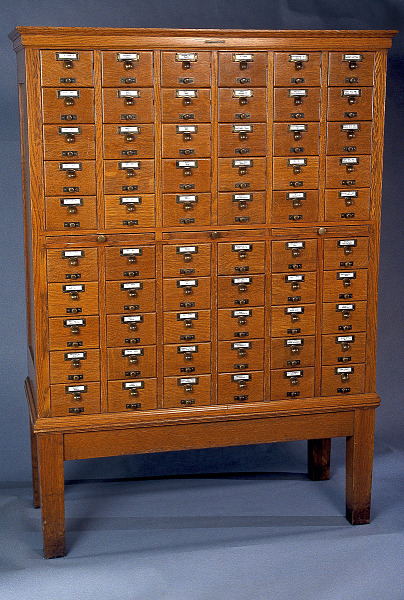
- Think of the computer memory as being like the images in Figure 1: a lot of numbered bins, where we can attach a variable name (possibly more than one).
- The variable names are the keys that allow us to access the bin. At any time, we can look at what is stored in the bin, or we can remove what is inside it and replace it with a new value.

Functions in Python
We have seen functions already (print, int, float, str), but haven’t really looked at them as a category before.
Functions are a key and important tool in programming. The idea of a function stems from functions in mathematics, where a function is defined with a name or descriptor, it takes one or two inputs, and it produces a value through evaluating some formula. For example, here is a simple math function: \[f(x, y) = 3x + 2y\].
What is a function?:
- A function is a named set of statements to perform some task
- Functions take zero or more inputs, often a specific number, sometimes any number
- Functions can cause side-effects such as printing or can return a value. Thus a function call can be an expression or a statement.
- A function call (we say we are “calling” a function or “invoking” a function) always looks the same:
functionName( input1, input2, …) - Inputs to a function are called arguments, or input parameters, and can be any Python expression
Operations on numbers
Remember that there are two separate number types we will use: int and float. All the operations below work on both kinds of numbers, but sometimes the results differ depending on the type, so be cautious.
Arithmetic operators:
- addition
+ - subtraction
- - multiplication
* - division (3 operators)
///% - exponentiation
** - parentheses for grouping, just like in math class
()
Watch out! The caret ^ is actually an obscure operator, but it is not exponentiation!
Built-in functions:
- Find the maximum or minimum of the group:
max(5, 7, 2),min(5, 7, 2) - Absolute value function:
abs(3),abs(-10) - Rounding function:
round(3.7),round(-1.2),round(3.92253, 3) - Conversion functions:
int(3.2),float(5)
Operations on strings:
Strings are a sequence type in Python, meaning that they are a linear collection of data. In this case, the data is just characters, the keys you can type on the keyboard, the letters that make up text. Python encodes its characters as Unicode, so we can theoretically include other symbols than typical American English ones.
Concatenation operators:
str1 + str2combinestr1andstr2to make one new stringstr * repsmakesrepscopies ofstr, all stuck together as one string
Membership operator:
value in stringasks the question: does substringvalueoccur anywhere instring
Access operator: pull single characters out of the string
string[index]accesses the character instringat positionindex
Note: strings are indexed left to right starting from zero, and right-to-left with negatives starting with -1. (see Table 1 to see how to index the example string "AB CD!")
"AB CD!"
A |
B |
|
C |
D |
! |
|
|---|---|---|---|---|---|---|
| positive indices: | 0 | 1 | 2 | 3 | 4 | 5 |
| negative indices: | -6 | -5 | -4 | -3 | -2 | -1 |
String slicing: extract a subset of characters from the string
string[start:end]extracts the substring starting at indexstartand going up to indexendstring[:end]extracts the substring starting at 0 and going up to indexendstring[start:]extracts the substring starting at indexstartand going to the end ofstringstring[start:end:skip]extracts a substring starting ad indexstart, going to indexend, and skipping everyskipcharacters
Functions on strings:
len(string)reports the number of characters in the stringmax(string)returns the alphabetically last character (ASCII)min(string)returns the alphabetically first character (ASCII)
Operations on Lists
A list is a sequence type in Python, which strings are also. Because both lists and strings are sequences, their operations can look very similar.
Lists are containers that hold other data, keeping the data in a linear sequence.
The data in a list can be any kind of Python data (we’ve seen integers, floats, strings, functions, and lists, and they all can go in a list). It doesn’t all have to be the same kind of data, either.
We create a list by putting square brackets around the data we want the list to contain, or by calling the list function.
Concatenation operators:
list1 + list2combineslist1andlist2to make one new listlist * repsmakesrepscopies oflist, all stuck together as one list
Membership operator:
value in listasks the question: does thevalueoccur as an itemlist
Access operator: pull single characters out of the list
list[index]accesses the data inlistat positionindex
Note: lists are indexed left to right starting from zero, and right-to-left with negatives starting with -1, just like strings
List slicing: extract a subset of data from the list
list[start:end]returns the sequence starting at indexstartand going up to indexendlist[:end]returns the sequence starting at 0 and going up to indexendlist[start:]returns the sequence starting at indexstartand going to the end ofstringlist[start:end:skip]returns a sequence starting atstart, going up toend, selecting everyskipitems
Functions on strings:
len(list)reports the number of pieces of data in the listmax(list)reports the largest number (or string) in the listmin(list)reports the smallest number (or string) in the list
Week 2
Monday, September 8
Announcements:
- MSCS Coffee Breaks: Starting next week, Thursdays, 11:15am, near MSCS department office
- MSCS Block Party, September 24, 4:45 - 6:30
- For declared or intended MSCS majors
- Games, food, etc.
- Advising: Set up appointments this week
- College skills: go to every professor’s office hours and get their signature
- Start working on Homework 1 during this week
- Join the Github assignment
- Clone the repository
- Read the problems
- Bring questions to me, Jay, and Sam!
- Start readings and videos for Ethics and Sci-Fi 2 today!
- Notes about grading:
- Make individual “teams” for ICAs for now
- ICAs may be handed in late with no penalty
- Incomplete ICAs will receive full credit
- The other side of those coins:
- Watch out for falling too far behind!
- ICA tasks are intended to help you learn, so if you skip too many of them, you might be missing something
- Moodle gradebook is an estimate, individual assignment ratings will be correct
- Spreadsheet shared with you is keeping track of your progress toward a specific final grade (let me know if it seems wrong)
- Adjustment to grading
- How to account for discussions in class?
- Four options, asking for your input here (in all cases you must complete about 2/3 of the days/activities/discussions to earn full credit)
- Option 1: Count disucssions as part of in-class work, contributing to Miro OR submitting ICA count, 20/30 for full credit
- Option 2: Count discussions as part of prep-for-class: doing comprehension quiz OR contributing to discussion in Miro fulfills that requirement; 20/30 for full credit
- Option 3: Add discussions as separate element of prep-for-class, and increase the number to do to 40/60 from 20/30
- Option 4: Add discussions as separate element of in-class work, and increase the number to do to 40/60 from 20/30
Big idea
A module is nothing more than a Python code file. Any Python code file can be considered a module, and imported into any other Python code file. When that happens, the code inside the imported file is run, except for certain code blocks that are carefully marked to be run only when the code is running on its own, and not when it is imported into another file.
By convention, modules are structured in certain ways, but there are no rules limiting the import of one code file into another! We will learn how to create Python code that can be easily imported into other code files, by avoiding script elements that would run when imported, except when we want them to.
Today’s plan:
- New teams for this week!
- Patrick, Sydney G, Wheaton
- Tene, Ethan, Skye
- Wyatt, Lindsay, Sabrina
- Ryder, Fiona, Lunga
- Bowen, Sydney P, Elabe
- Mohamud, Farihatou
- Discussion of readings for today and Comprehension Quiz with new group
- Debugging
- Modules
- OpenCV!
- Finish up ICAs (in-class activities) 1 and 2
- Start work on ICA 3: math module, random module, OpenCV basics
Debugging
- Code you write typically does not work the first time
- Computers are not smart, and rigid
- Humans like ambiguity, metaphor, and flexibility
- Errors in code are called bugs
- Debugging is the process of removing errors from your code
- Debugging can be intensely frustrating
- You want to start building debugging skills, because you will spend more time debugging than you will writing the original code
How to minimize frustration:
- Be systematic
- Work out the rough steps on paper before starting to code
- Know exactly which steps you will try to do first
- Prepare a set of examples to test your code on, where you know the right values for each step
- Make sure you know what every line of code is supposed to do, and be prepared to check what it is actually doing
- Get something working and then modify it (“incremental development”)
- Write only a few lines at a time, then run them and test
- Use lots and lots of print statements to see all the intermediate values you create (once you are convinced those code lines work, you can comment out or delete the print statements!)
- Slowly work up to the whole program
- Test thoroughly
- Check your code on multiple examples
- Think of “boundary conditions”: examples that push the limits of the program, or that are valid but slightly odd, and make sure to test them
Tips:
- Don’t blame Python! The chances of you finding a bug in Python itself are vanishingly small. If the code doesn’t do what you want it to, it’s because you haven’t communicated what you want to Python correctly
- Read error messages carefully!
- Error types tell you useful information
- Message itself will give more details
- Traceback will tell you exactly which line of code was running when the bug was discovered (the bug may have originated from earlier)
- Add print statements
- Print multiple values on one line to save output
- Include a descriptive string with every print statement to ensure that you know what values you are seeing
- Comment out problematic code to figure out the original source of a bug, and to determine what is currently working correctly
Common errors:
ParseErrororSyntaxError:- The code it was trying to run isn’t properly formatted Python code
- This error may often have a source earlier than where it is discovered
- Can be helpful to comment out the line it references, to see if the error is there or earlier
TypeError:- You tried to apply an operation to a data type that it doesn’t work for
- OR (more often) you tried to combine two incompatible types
- Read the error message carefully: it tells you the line number, and the types of the things that caused a problem. It even tells you the operator that was involved!
NameError:- Usually means you have used a variable name prior to it being defined
- Most often, there is a typo in the name, either on the line with the error, or the line where the variable was initialized
ValueError:- Happens when you pass a function a value it can’t work with, like asking the int function to convert the string “b”
- Check the values being passed to the function, and their types
Modules
Python has hundreds of modules provided with the language, thousands that you can install
A module is just a code file, providing global variables, functions, maybe even data representations
We explicitly import a module when we need its tools:
mathmodule- Constants:
pi,e - Functions for computing logs, exponents, trigonometry, square-root, etc.
- Constants:
randommodule- Functions for generating pseudo-random numbers (integer, float)
- Functions for choosing a random element from a list
- Different random distributions (uniform, gaussian, etc.)
numpymodule- New array/matrix data type
- Functions, operators, and methods for efficient calculations with arrays and matrices
cv2module- OpenCV module
- Representation of an image as a Numpy array
- Thousands of image processing and computer vision algorithms and tools
Importing a module:
There are three main forms for import statements, shown below.
- 1
-
Import the
mathmodule, creating a module object calledmath - 2
-
Import the
numpymodule, but rename the module objectnp - 3
-
Import just
piandsqrtfrommath, without a module object - 4
-
Import all of
cv2without a module object (bad idea!)
The basic import statement creates a variable in Python with the name of the module, and assigns to it a module object, which contains all of the constants and functions defined in the module.
We can also rename the module when we import it, as shown in the second example above. For some modules, like numpy, it has become standard to use a shorter name: most code examples you see that use numpy will import it in this way.
Using the from operation, we can import part or all of a module, without creating a module object. The third example shows how we can use this to import just one or two items from a module, and the fourth example shows how to import the full contents of a module without creating a module object.
Warning: Using the last import format is discouraged, as the functions, constants, and data types defined in the module will live in the same global namespace as your own code, and can conflict with your code, without you even realizing. It is dangerous!
Using module constants, functions, operators:
When we import a module normally, we must refer to the tools in the module as a part of the module. We do this by attaching the module name to the front of the variable/function reference: `
import math
import random

area = math.pi * (25.0 ** 2)
print("Area of circle with radius 25.0 is", area)
r1 = random.random()
r2 = random.random()
print(r1, r2)
Area of circle with radius 25.0 is 1963.4954084936207
0.8685235116587483 0.13992265798759396This computes the area of a circle with radius 25.0 by referencing the math module’s contant pi, and it computes two random floats between 0.0 and 1.0 using the random function in the random module.
Starting with OpenCV
The OpenCV module for Python is called cv2.
Check that OpenCV is installed and configured properly by trying the following script. If it prints a number, you are ready to go. If it doesn’t work, then ask for help immediately.
Reading and displaying images
The script below, added to the previous script, uses three OpenCV functions to read in and display an image.
- The script below includes a relative path string, passed to
imread. This expects that this code file will be in the same folder as theSampleImagesfolder, and that thechicago.jpgimage is directly insideSampleImages. Verify both of these things - Remember that
cv2.imreadreads an image file and creates and returns a BGR image array. You must save the returned array to a variable, as shown here, to be able to use it - Remember that
cv2.imshowandcv2.waitKeywork together to display an image, which should be either OpenCV’s grayscale or its BGR format
Digital colors and images
Color representations
- Colors are light waves at varying wavelengths in the visible light spectrum
- There are many different ways to represent colors inside the computer. We choose a representation based on what is best for our use
- RGB (red-green-blue) is the most common representation, because it is used by computer displays
- OpenCV uses BGR (RGB backwards)
- Three 8-bit integers make up a color for BGR: one for each color channel
- Channel values therefore range from 0 to 255
- Examples:
- (0, 0, 255) – red
- (0, 255, 255) – yellow
- (128, 0, 0) – dark blue
- (128, 0, 128) – dark magenta
- (250, 250, 250) – very light gray, almost white
- (75, 75, 75) – very dark gray
- Examples:
Other color representations:
- HSV/HSL: Color, hue, is the first channel, Saturation and Value or Saturation and Lightness handle brightness and intensity of color (good for matching color hues when light level is variable)
- YUV: Brightness is the first channel, and color is represented by the second two (good for standardizing image brightness)
Image representations
- A pixel is the smallest unit of an image: a single color
- An image is a grid of pixels with width (x-dimension) and height (y-dimension)
- OpenCV images are 3-dimensional Numpy arrays: first two array dimensions correspond to height and width, and channel is the third dimensions
- Grayscale images have just one channel, thus have only two dimensions in the Numpy array
Drawing on images with OpenCV
- OpenCV provides basic tools for drawing on images
- We can read in an image and then draw shapes on it, OR we can create image arrays with Numpy
- See readings for details about how to use each drawing function.
Creating blank image arrays
If we create a 3-dimensional Numpy array, where the numbers are 8-bit unsigned integers, then OpenCV will interpret it as an image. The zeros and ones functions in Numpy allow us to create these images.
- Both functions take the same inputs: a tuple giving the dimensions for the array, and a Numpy constant telling what type of data the array should hold.
In the script below, npImage1 will be 400 pixels by 400 pixels, with three channels, it will hold 8-bit unsigned integers, and the array is initialized to be all zeros. The npImage2 array will be 300 pixels tall by 600 pixels wide, also with three color channels. The array returned by ones is filled with ones, and we then multiply by 128 to get an array that is completely filled by 128’s: a middle gray background color.
The script below uses drawing functions to draw shapes on these two images.
import cv2
import numpy as np
npImage1 = np.zeros((400, 400, 3), np.uint8)
npImage2 = 128 * np.ones((300, 600, 3), np.uint8)
cv2.rectangle(npImage1, (100, 10), (300, 390), (0, 150, 255), -1)
cv2.circle(npImage1, (200, 75), 50, (0, 0, 255), -1)
cv2.circle(npImage1, (200, 200), 50, (0, 255, 255), -1)
cv2.circle(npImage1, (200, 325), 50, (0, 255, 0), -1)
cv2.line(npImage2, (50, 50), (550, 50), (180, 0, 0), 3)
cv2.line(npImage2, (550, 50), (550, 250), (180, 0, 0), 3)
cv2.line(npImage2, (550, 250), (50, 250), (180, 0, 0), 3)
cv2.line(npImage2, (50, 250), (50, 50), (180, 0, 0), 3)
cv2.putText(npImage2, "Happy Day!", (75, 175), cv2.FONT_HERSHEY_SIMPLEX, 2.5, (255, 255, 0))
cv2.imshow("First", npImage1)
cv2.imshow("Second", npImage2)
cv2.waitKey()- 1
- Draw an orange rectangle
- 2
- Draw red, yellow, and green circles
- 3
- Draw a blue border
- 4
- Add text to the center of the image
Note: To get the text the right size, and centered on the screen, I started with my best guess, and then ran and re-ran the code, making small changes to either position or size, until I was satisfied.
Wednesday, September 10
Announcements:
- MSCS Coffee Breaks: Starting next week, Thursdays, 11:15am, near MSCS department office
- MSCS Block Party, September 24, 4:45 - 6:30
- For declared or intended MSCS majors
- Games, food, etc.
- Advising: Set up appointments this week
- College skills: go to every professor’s office hours and get their signature
- Keep/start working on Homework 1 during this week
- Join the Github assignment
- Clone the repository
- Read the problems
- Bring questions to me, Jay, and Sam!
- Ethics and Sci-Fi 2 due Friday at the start of class
Today’s topics:
- The
forloop - The
rangefunction - Different looping patterns
- Accumulator variables
The for loop
Loops allow our programs to repeat the same set of steps over and over, without writing them out repeatedly. Loops are one kind of control structure.
The for loop repeats for a set number of times, either once for each value in a list or string (or other data types we’ll learn about later), or once for each number in a specified range.
for loop forms
Meaning: Set variable to each value in the sequence in turn, and then, for each value, perform the indented steps in the statement sequence
- Variable set to first value in sequence
- Perform statement sequence
- Variable set to second value in sequence
- Perform statement sequence again
- …
Looping over the values in a list:
This code example:
- repeats 4 times, because there are 4 elements in the list
colorassigned to the value'red'for the first pass, then to'blue'for the second, etc.- indented body of loop may refer to
color, and the value will change each time
Looping over a range of integers:
This code example:
- repeats 20 times
itakes on the values from 0 to 19 each time through the looprangeproduces an iterator, an object that produces the next number each time it is asked
Different forms of range:
range(stop), starts counting at 0 and goes up to but not including stop- `range(25)
range(3)
range(start, stop), starts counting at start and goes up to but not including stoprange(5, 25)range(1, 3)
range(start, stop, step), starts counting at start and goes up to but not including stop, skipping step numbers each timerange(25, 50, 5)range(10, 0, -1)
The accumulator pattern
When programming, there are common patterns that re-occur across a wide range of problem types. We can take advantage of these by recognizing them and then following the pattern (reducing our cognitive load again!).
When to apply the accumulator pattern
- When you are writing a loop
- When each pass through the loop contributes information to a final answer that is being constructed, or accumulated
- In a script or a function, anywhere
Examples:
- You want to add up the numbers in a list
- You want to build a list that holds the squares of the numbers from 0 to N
- You want to build a string containing the data from a list, each separated by a * from the next
What is the pattern
- Always has two parts: initialization and update
- Accumulator variables: holds the partial answers as the loop runs
- Start out empty
- Ends with the whole answer in it
- Initialization: set up the accumulator variable
- Add an assignment statement before the start of the loop
- In that statement, create the accumulator variable and assign it an empty initial value
- Be sure that the type of the initial value matches what you want to build (is the final result a number, a list, a string?)
- Choose the simplest form of that data type (0 for numbers, the empty list [] for lists, the empty string “” for strings) unless you know of some different starting value
- Update: inside the loop, modify the accumulator variable
- Usually update at the end of the loop
- Add an assignment statement that has the accumulator variable on both left and right sides
- Assignment should take the old value of the variable and update it with information from this pass of the loop
- Then the result is stored back into the same variable
Examples (what does it look like?)
Examples:
- You want to add up the numbers in a list
- You want to build a list that holds the squares of the numbers from 0 to N
- You want to build a string containing the data from a list, each separated by a * from the next
Friday, September 12
Announcements:
- MSCS Coffee Breaks: Starting next week, Thursdays, 11:15am, near MSCS department office
- Resume Workshop, sponsored by MSCS SAB, Wednesday, Sept 17, 4:40-5:30pm, OLRI 254
- Pre-health Student Orientation, Wednesday, Sept 24, 4:45-5:30pm, OLRI 250
- Thursday, 12:00-1:00pm: MSCS seminar / Puzzle Palooza with Ben Orlin!
- Please join us for some math puzzles with the author of “Math With Bad Drawings”.
- MSCS Block Party, September 24, 4:45 - 6:30
- For declared or intended MSCS majors
- Games, food, etc.
For this class:
- Turn off Inline Completion
- Open up Settings
- Look at the Editor settings
- Click on General, and then Inline Completion
- Uncheck Enable full line completion suggestions
- Advising: Set up appointments this week
- College skills: go to every professor’s office hours and get their signature
- Ethics and Sci-Fi 2 due TODAY at the start of class
- Homework 1 due in one week: work hard on it this weekend!
Today’s topics:
- Group discussion of Ethics and Sci-Fi 2
- The Boolean data type
- Conditionals: the
ifstatement
Boolean data type
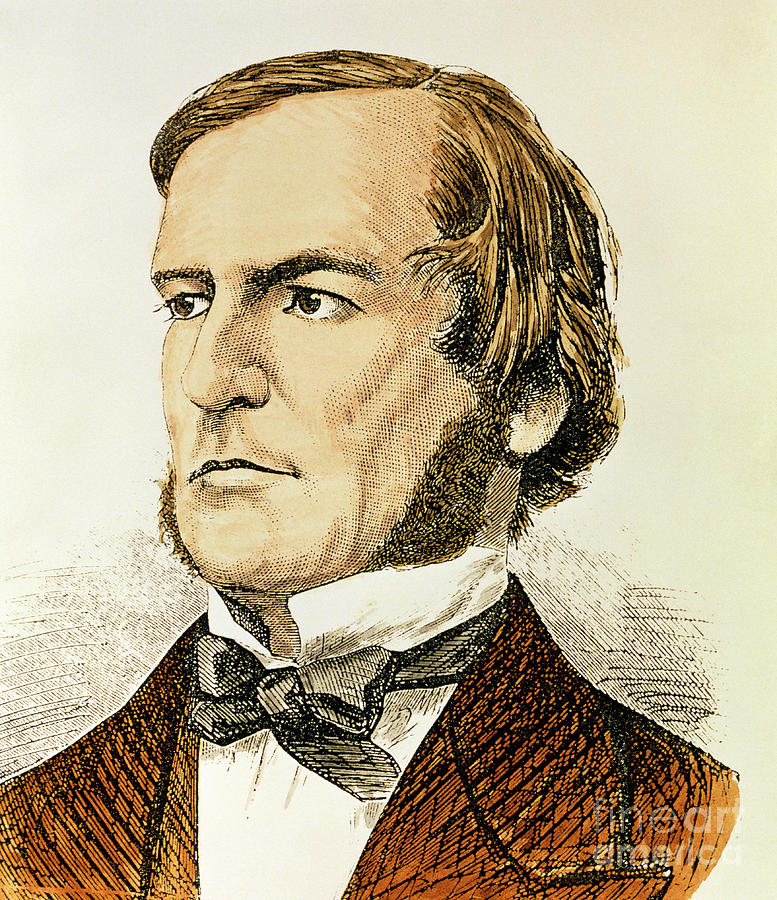
George Boole was an English mathematician who was interested in connecting the kind of reasoning in mathematics to the kind of logical reasoning that philosophers use. He invented a whole algebra based on True/False as values. This was very important for Computer Science, because everything we do with digital computers is based in 1’s and 0’s, which can be thought of as Trues and Falses. Also, when we write programs, we need them to ask questions about the data they work on, and make different actions based on the answers. This also fits with the True/False model.
So we named the True/False data type “Boolean”
Python bool data type
- Constants:
TrueFalse - Expressions (many many):
x < 25,str[0] < 'm' - Comparing numbers, comparing strings (based on the ASCII table), comparing lists
- Operators (
and,or,not):(x < 25) and (str[0] == 'a') - Short-circuiting operators
How can we use boolean expressions?
If statements: control structures that choose alternative code to perform
You can have just the if part, with one boolean test expression. Then the body statements are only performed if the test expression evaluates to True.
You can have an if and an else, with one boolean test expression. The first indented body is performed if the expression evaluates to True, and the second indented body is performed if the expression evaluates to False.
Between the if part and the else part, you can have as many elif parts as you wish. These ask new questions. Only one section of statements is performed: the one following the first boolean expression that evaluates to True! After that, no other expressions or statements are evaluated.
If you have a second if, that signals the end of the previous if statement and the start of a brand-new conditional, not at all linked to the previous one!
Things that are “true-ish” or “false-ish”
Python lets you put any kind of data in the test part of an if statement, or as an argument to a boolean operator like and, or, or not. (try the examples below) * * Things that are considered “false”: False, 0, 0.0, “”, [], None * Everything else is true
Examples:
for dat in [True, False, 0, 5, -2, 0.0, 12.586, -0.000001, "", "a", "False", [], [True], [False], ['a', 'b', 'c']]:
    if dat:
        print(dat, "= TRUE")
    else:
        print(dat, "= FALSE")

print()
print("'a' and 'b' and 'c' =", 'a' and 'b' and 'c')
print("'a' or 'b' or 'c' =", 'a' or 'b' or 'c')
print(not 3)
print(not [])
print(not None)
True = TRUE
False = FALSE
0 = FALSE
5 = TRUE
-2 = TRUE
0.0 = FALSE
12.586 = TRUE
-1e-06 = TRUE
= FALSE
a = TRUE
False = TRUE
[] = FALSE
[True] = TRUE
[False] = TRUE
['a', 'b', 'c'] = TRUE
'a' and 'b' and 'c' = c
'a' or 'b' or 'c' = a
False
True
TrueWeek 3
Monday, September 15
Announcements:
- Resume Workshop, sponsored by MSCS SAB, Wednesday, Sept 17, 4:40-5:30pm, OLRI 254
- Pre-health Student Orientation, Wednesday, Sept 24, 4:45-5:30pm, OLRI 250
- MSCS seminar / Puzzle Palooza with Ben Orlin!, Thursday, 12:00-1:00pm, OLRI 254
- Please join us for some math puzzles with the author of “Math With Bad Drawings”.
- MSCS Block Party, September 24, 4:45 - 6:30
- For declared or intended MSCS majors
- Games, food, etc.
For this class:
- Homework 1 due Friday this week
- Start readings and videos for Ethics and Sci-Fi 3 today!
- Monday, September 22 is our first Coding Quiz
- See Study Guide (still in development)
New Teams for this week:
- SydneyP, Tene, Elabe, Wyatt
- Bowen, Mohamud, Patrick, Skye
- Ethan, Farihatou, Sabrina
- Wheaton, Lunga, Fiona
- Lindsay, SydneyG, Ryder
Topics for today:
- Function calls
- Defining functions
- Global and local environments
Vocabulary about functions
- algorithm: a sequence of steps that describe how to solve some problem
- argument: the data passed into a function for it to operate on
- control structure: a compound statement that alters the usual top-to-bottom, step-by-step ordering of steps in a Python program (examples: for loops,…)
- function: a named piece of code that performs certain steps, given some data as input, and that sometimes returns a value
- call a function/invoke a function
- function call: an expression or statement that passes input arguments to a function, so that it actually runs
- function definition: a structure that defines a new function that your program may use. The first line specifies the functions names, and variable names for its input values, and the indented block of statements below that are the body of the function, the statements that are performed when the function is called
- input parameter variable: A variable used in a function definition as a placeholder for an input that will be passed in when the function is called
- local: variables inside a function are local, only visible and existing temporarily only during calls to the function
- methods: functions that belong to an object and must be called by referring to the object they belong to
- parameter: an input to a function
- pseudocode: structured natural language description of an algorithm
- variable: a name for a location where we can store data
- set/assign/instantiate a variable
A function is a procedural abstraction, ie, a function is a name for a set of instructions. A function is more abstract than a script because a function takes a set of pre-specified inputs compared to a script that has all the data it works on defined before the program is run.
Functions we define, like the scripts we have been writing before this, are a way of describing an algorithm to the computer. A function has the benefit of doing all its work in its own “space,” which is separate from the main, global space. The technical name for these “spaces” is environment. An environment has a set of variables and functions defined in it, and environments can be nested inside each other. You can think of an environment as a table with variable and function names in the first column, and the data values in the second column.
When a function is called, a new environment is created, where the function keeps its own variables.
While it is possible to refer to global variables from inside a function, the function’s own variables exist only inside the function, and only have values for the duration of a call. The function’s environment goes away at the end of the function call.
Function Calls
All function calls look the same: first, the name of the function followed by an open parenthesis (, then any input arguments for the function, and then a close parenthesis ). The function performs its task and sometimes returns a value. Below are some calls to built-in functions we have tried already. The first function call does not return a result, but the rest do. The return value replaces the function call in the larger expression or statement: so we can take the value of max and use it directly in an arithmetic example, as line 5 below does.
Function Definitions
A function definition creates the function object and stores it in the global environment. It does not cause the steps inside the function to run; that only happens afterwards when the function is actually called. A function definition needs to specify (1) the name of the function, (2) the inputs to the function, and (3) what should happen when the function is called including what value should be returned, if any. Below is an outline of what a function definition looks like–it’s not a real function, though.
Tracing Functions by Hand
To gain a better understanding of how functions work, we will trace by hand what happens when a call is made to a function we have defined. We will also try other tools within Python and PyCharm and elsewhere such as the Online Compiler, Visual Debugger, and AI Tutor to help us visualize what is happening.
Consider the following function, which takes in three numbers and returns the smallest difference between the three numbers.
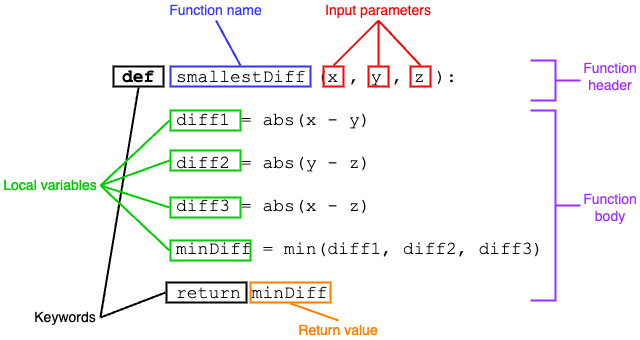
Figure 2 labels the key elements of this function.
smallestDiff
x,y, andzare the (formal) input parameters.diff1,diff2,diff3, andminDiffare local variables, only existing within the function (as arex,yandz).- This function calls other functions, built-in Python functions
absandmin, to help do its job. - The return values of
absandminare stored into variables to keep track of them. - The return value of
smallestDiffis the value ofminDiff.
Suppose we make the following call to the function:
Let’s walk through the steps in making this call.
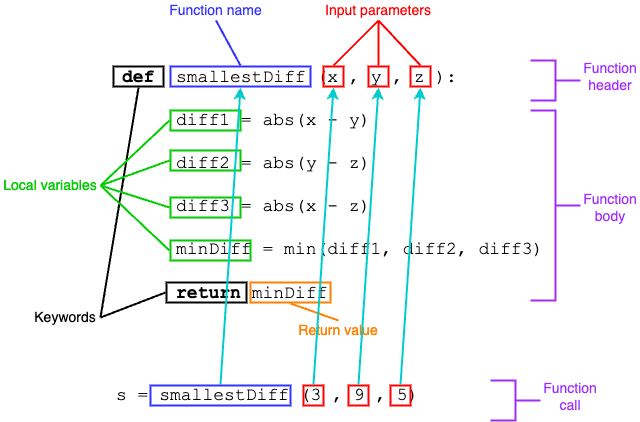
Step one: Python matches the function name from the call to the function definition for that name, and then matches each input parameter to the corresponding argument, as shown in Figure 3.
smallestDiff with function call
Step two: Python then builds a local environment for the call, as shown in Table 2:
smallestDiff(3, 9, 5)
| Variables | Values |
|---|---|
| x | 3 |
| y | 9 |
| z | 5 |
Step three: Each indented line in the function is executed, in order. New variables are added to the local environment table, one after the other as illustrated below.
Table 3, after line 2 of the function:
diff1 = abs(x - y)
| Variables | Values |
|---|---|
| x | 3 |
| y | 9 |
| z | 5 |
| diff1 | 6 |
Table 4, after line 3 of the function:
diff2 = abs(y - z)
| Variables | Values |
|---|---|
| x | 3 |
| y | 9 |
| z | 5 |
| diff1 | 6 |
| diff2 | 4 |
Table 5, after line 4 of the function:
diff3 = abs(x - z)
| Variables | Values |
|---|---|
| x | 3 |
| y | 9 |
| z | 5 |
| diff1 | 6 |
| diff2 | 4 |
| diff3 | 2 |
Table 6, after line 5 of the function:
minDiff = min(diff1, diff2, diff3)
| Variables | Values |
|---|---|
| x | 3 |
| y | 9 |
| z | 5 |
| diff1 | 6 |
| diff2 | 4 |
| diff3 | 2 |
| minDiff | 2 |
When it reaches the last line of the function body, the value of minDiff is returned, and the local environment is deleted. Figure 4 shows how the value of minDiff will be passed back and assigned to s.
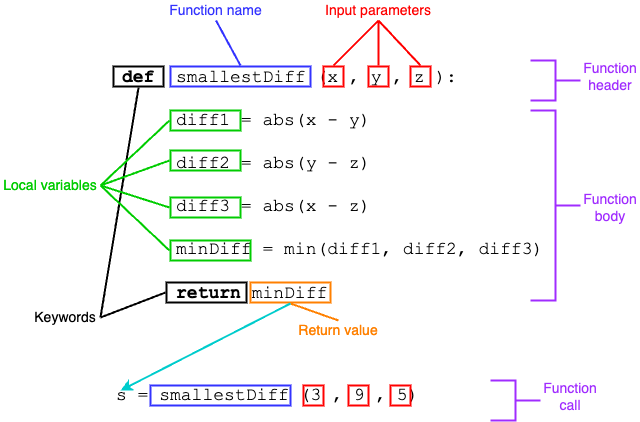
smallestDiff
Wednesday, September 17
Announcements:
- Resume Workshop, sponsored by MSCS SAB, Wednesday, Sept 17, 4:40-5:30pm, OLRI 254
- Pre-health Student Orientation, Wednesday, Sept 24, 4:45-5:30pm, OLRI 250
- MSCS seminar / Puzzle Palooza with Ben Orlin!, Thursday, 12:00-1:00pm, OLRI 254
- Please join us for some math puzzles with the author of “Math With Bad Drawings”.
- MSCS Block Party, September 24, 4:45 - 6:30
- For declared or intended MSCS majors
- Games, food, etc.
For this class:
- Homework 1 due Friday this week
- Start readings and videos for Ethics and Sci-Fi 3 today!
- Monday, September 22 is our first Coding Quiz
- See Study Guide
New Teams for this week:
- SydneyP, Tene, Elabe, Wyatt
- Bowen, Mohamud, Patrick, Skye
- Ethan, Farihatou, Sabrina
- Wheaton, Lunga, Fiona
- Lindsay, SydneyG, Ryder
Topics for today:
- The accumulator pattern
- Program style
- Using a main function or script
- Flow of execution
- Incremental development
- Continue with Function Basics activity, and move on to Function Practice
Big Ideas:
Coding “style” is for humans! We follow certain conventions when we write programs that are not important for the computer’s understanding, but are designed to make programs easier for the writer and other human readers to understand. In some languages, indentation is one of the pieces of style, but Python forces you to use indentation “properly” as part of the meaning of the program. But other aspects of style to pay attention to:
- Well-written comments
- Variable naming conventions: meaningful, short, camelcase or C-style
- Use of whitespace and blank lines (like separating paragraphs of text in a paper)
- File organization: placement of import statements, functions, and script elements
The Accumulator pattern
When programming, there are common patterns that re-occur across a wide range of problem types. We can take advantage of these by recognizing them and then following the pattern (reducing our cognitive load again!).
When to apply the accumulator pattern
- When you are writing a loop
- When each pass through the loop contributes information to a final answer that is being constructed, or accumulated
- In a script or a function, anywhere
What is the pattern
- Always has two parts: initialization and update
- Accumulator variables: holds the partial answers as the loop runs
- Start out empty
- Ends with the whole answer in it
- Initialization: set up the accumulator variable
- Add an assignment statement before the start of the loop
- In that statement, create the accumulator variable and assign it an empty initial value
- Be sure that the type of the initial value matches what you want to build (is the final result a number, a list, a string?)
- Choose the simplest form of that data type (0 for numbers, the empty list
[]for lists, the empty string""for strings) unless you know of some different starting value
- Update: inside the loop, modify the accumulator variable
- Usually update at the end of the loop
- Add an assignment statement that has the accumulator variable on both left and right sides
- Assignment should take the old value of the variable and update it with information from this pass of the loop
- Then the result is stored back into the same variable
Examples:
You want to add up the numbers in a list:
lst = [25, 102, 78, 60, 291]
tot = 0    # Initialize accumulator to zero (since we are adding)
for val in lst:
    tot = tot + val    # Update step, adds to old value of accumulator
print("Final value:", tot)
Final value: 556You want to build a list that holds the squares of the numbers from 0 to N:
N = 10
sqList = []   # Initialize accumulator to [] (since we are building a list)
for x in range(N+1):
    sqList = sqList + [x ** 2]   # Update accumulator
print(sqList)
[0, 1, 4, 9, 16, 25, 36, 49, 64, 81, 100]You want to build a string containing the data from a list, each separated by a * from the next
Writing with good Python style
File layout:
- First: import statements and any program-wide global variables (this is unusual)
- Second: function definitions in some organized order, with comments and blank lines/demarcations
- Last: script elements that call functions
Using spaces for readability
- Use spaces to separate elements of a list, variables in a function call or declaration, parts of arithmetic expressions
- Use blank lines between elements in your file, even sections of a function or script
- Use comment lines with visual separators to separate sections
- Visual separate is a good thing
Pycharm can nag your about Python style
If it is enabled in the settings, Pycharm will alert you with light tan warning messages when you are violating a standard Python style. You may pay attention or not, we won’t require you to follow the rules (especially around variable-naming conventions) but it can help to suggest readable code.
Documenting your code, and the help function
Python has standard ways of documenting our programs. These can be used to generate webpage documentation, and can also be helpful when running your code, because Python provides a function called help that will print documentation from code files. See examples in the video.
The main program:
- You may define a function that runs your whole program
- It doesn’t need to be called
main - It usually goes either first or last in the function definitions
- You often put a call to this main function as the only script element at the bottom
- It doesn’t need to be called
- You may, instead, define a script that runs your whole program
- The
if __name__ == '__main__':form- What: put all script statements inside this statement, and make sure something is not commented out
- Why: makes it easier to treat your program like a module
- The
Flow of execution
The term, flow of execution, refers to the order that statements in a program are executed, taking into account all the control structures, like loops and conditionals, as well as function definitions and calls. It is important that you be able to trace through the flow of execution by hand and determine exactly what the program would do when. If you can’t do that, then you don’t really understand what the code is doing. Practice this!
Examine the program below
def funcA(x):
    print("A", x + 2)
    return x + 2

def funcB(y):
    y = funcA(y)
    print("B", y)
    y = funcA(y + 10)

print("Script 1")
for i in range(3):
    funcB(i)
print("Script 2")
Script 1
A 2
B 2
A 14
A 3
B 3
A 15
A 4
B 4
A 16
Script 2What is the output from this function? Walk through it by hand, and determine what messages will print when. There should be 11 lines of output. I will walk through this in my video, but you should try it yourself
Friday, September 19
Announcements
- Pre-health Student Orientation, Wednesday, Sept 24, 4:45-5:30pm, OLRI 250
- MSCS Block Party, September 24, 4:45 - 6:30
- For declared or intended MSCS majors
- Games, food, etc.
- Homework 1 is due today!
- Come prepared to discuss Ethics and Sci-Fi 3
- Token “assignment” in Moodle to claim tokens for extra time on HW
- Change to how Homework 1 is posted in Moodle, no change in grading…
Today’s topics
- Today is a “Catch-up” day. No new material, but
- Discussion of Ethics and Sci-Fi 3
- Questions from study guide
- Opportunity to work on existing activities
- Chance to work on homework with peers, preceptors, and instructor present
Additional Class Notes documents
- Class notes for weeks 0-3 (this document)
- Class notes for weeks 4-7
- Class notes for weeks 8-11
- Class notes for weeks 12-15